


You build baskets in the Prizes area. The order is always the same: categories first, then baskets inside them.
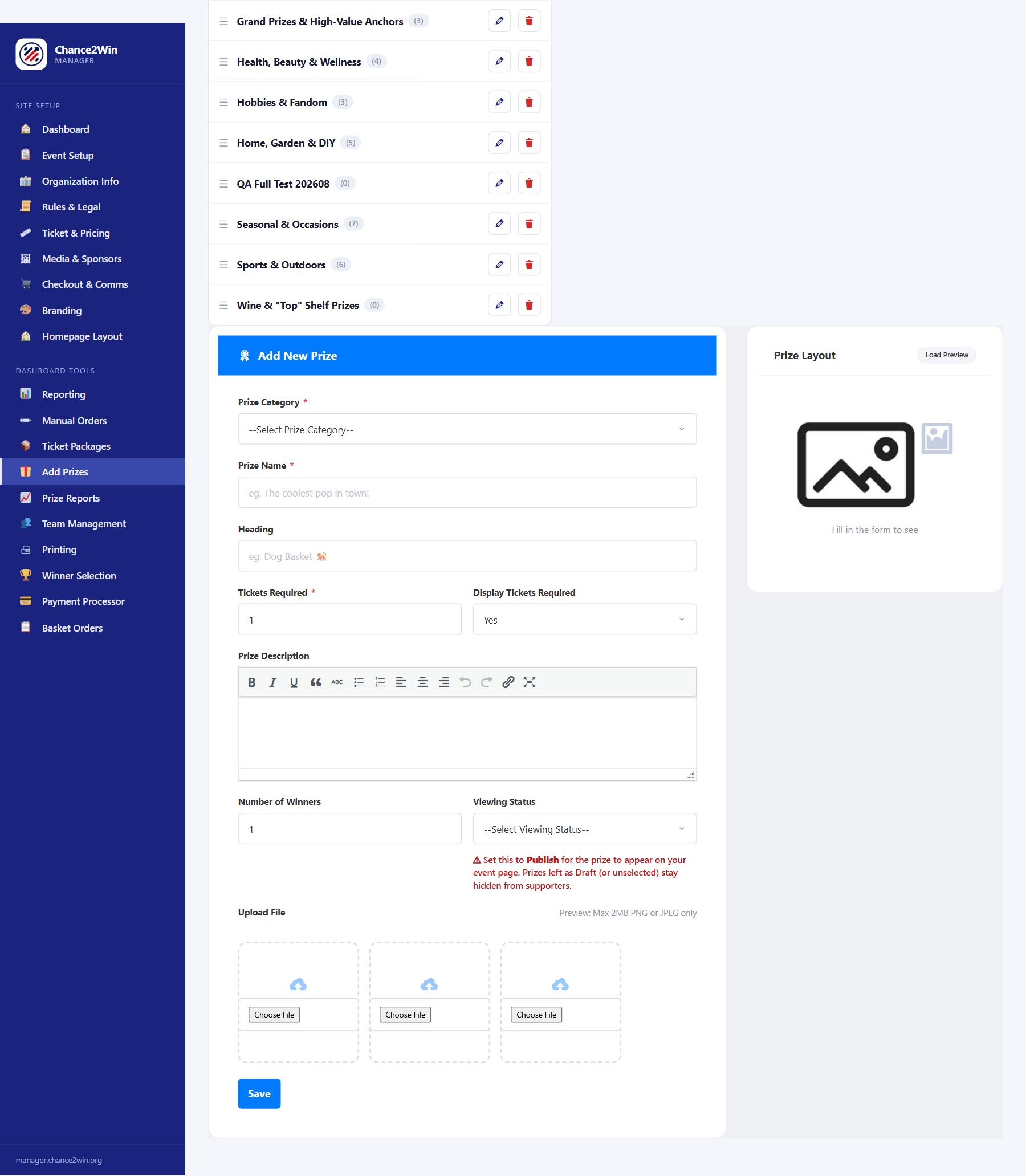
1. Create your categories #
Categories group your baskets — think “Family Fun” or “Date Night.” Drag to reorder them; the order you set here controls how they appear on the public page.

2. Create a basket and assign its category #
For each basket, fill in:
- Prize Name and Heading
- Description
- Tickets Required — the minimum number of tickets it takes to enter this basket (see Basket Allocation Rules)
- Display Tickets Required — what supporters see for that requirement
- Number of Winners — use this for baskets that draw more than one winner
- Status — Draft or Published
- Up to three images
3. Publish only complete baskets #
Draft baskets stay hidden from the public page. A Draft basket with no tickets against it can still be published or deleted before launch. Before you open sales, verify the public order, the minimums, visibility, and Prize Reports.
Image rule. Basket images accept PNG and JPEG only, up to 2 MB each. Other file types — PDF, DOC/DOCX, SVG, oversized, renamed, or corrupt files — are rejected and must never leave a broken attachment behind. Never upload private documents as images.
Build your first category and basket, then preview the public page before adding the rest. — The Chance2Win Team


