


Section 6 is optional, and it’s about what happens at the moment of purchase — plus how you stay in touch afterward. Small toggles, real impact.

The toggles #
- Email Opt-In Box — adds a mailing-list checkbox at checkout. Turn this on. The supporters who buy today are exactly the ones you want to invite back next year.
- Fast Checkout Mode — a single-page checkout with basket assignment. Fewer steps between “I want to help” and “done.”
Reality check. Every extra step at checkout costs you buyers. That’s the whole reason we obsess over checkout friction — it moves fundraising totals more than pricing does. Fast Checkout exists because a shorter path means more completed orders.
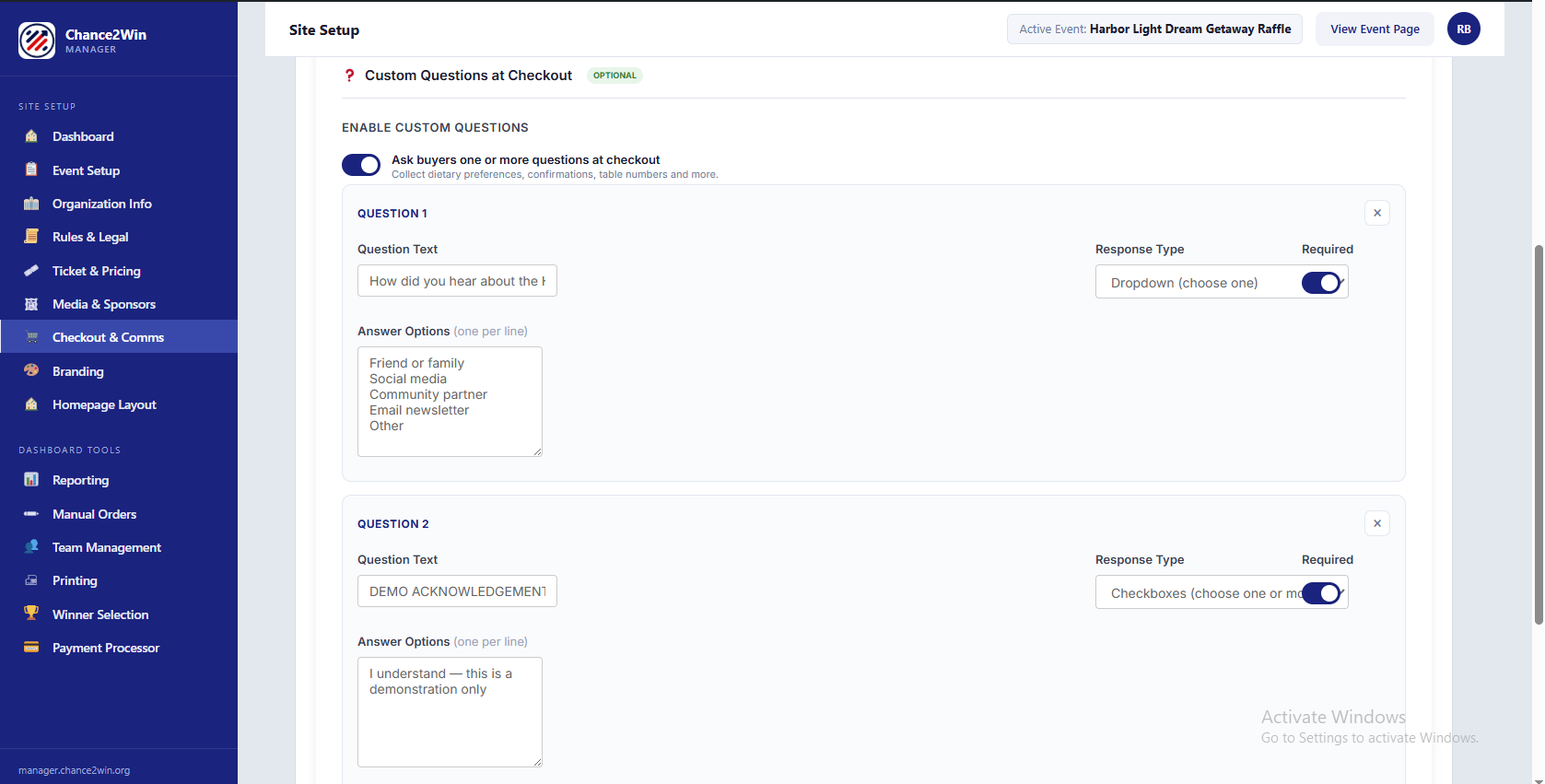
Ask a custom question #
Flip on Enable Custom Question at Checkout to ask buyers one extra thing — dietary preference for the gala, a table number, a t-shirt size. Pick a response type (text, dropdown, or checkboxes) and mark it required or optional.
Pro tip. Keep custom questions to one, and only ask if you’ll actually use the answer. Every field you add is one more thing between the buyer and the finish line.
Set? Save & Continue takes you to Section 7: Branding & Colors.


